I’m going to be honest with you. The first time someone explained TCP/IP to me I nodded along and understood absolutely nothing. It felt like someone reading out loud from a dictionary. Layers this, encapsulation that. Great. Thanks.
The problem wasn’t the concepts. The problem was nobody explained why it matters. And for a hacker, the why is everything.
So let’s try this differently.
Before You Touch a Single Tool
Every exploit, every CTF challenge, every bug bounty finding you’ll ever come across has the same thing underneath it: data moving from one machine to another. That’s the whole game. The internet is just computers talking to each other, and most of those computers are talking in ways they probably shouldn’t.
Once you understand how they talk, you stop seeing targets as black boxes. You start seeing layers. And layers have cracks.
The Stack: How Data Actually Travels
Forget the OSI model. Seven layers with names like “Presentation Layer” and “Session Layer” that exist mostly to make certification exams harder. In the real world, in actual traffic, what you need is the TCP/IP model. Four layers. Everything that actually moves on a network uses it.
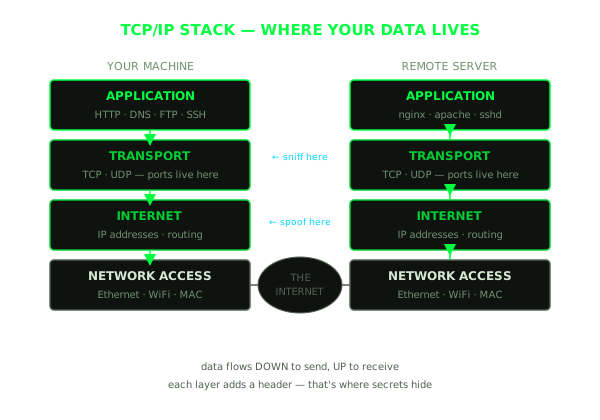
Think of each layer as an envelope inside another envelope. Your message goes in, then the application layer wraps it with protocol info, then the transport layer adds port numbers and delivery instructions, then the internet layer stamps the IP address on it, then the network layer shoves it onto the wire.
On the other side, the receiver opens each envelope in reverse. Simple.
Here’s the thing nobody tells you at first: every single layer leaks information. Application layer might expose what server version is running. Transport layer shows you which ports are open. Internet layer gives you routing paths, TTL values, sometimes even OS fingerprints. Each envelope is a label, and attackers read labels.
The layers:
- Application: where protocols live. HTTP, SSH, DNS, FTP. You’ll spend most of your time here as an attacker, it’s where the interesting bugs are.
- Transport: TCP or UDP. Port numbers live at this layer. If the application layer is “what are they saying”, the transport layer is “which door did they knock on.”
- Internet: IP addresses and routing. Getting packets from your machine to theirs, across whatever path the network decides.
- Network Access: ethernet, WiFi, MAC addresses. Mostly invisible until you’re doing ARP poisoning or working on a local network.
Ports: This Is Where the Attack Surface Lives
A server has one IP address. It might be running fifteen different services at the same time. SSH, a web server, a database, some internal admin panel someone forgot about. How does the operating system know which traffic goes where?
Ports.
Every TCP or UDP connection has a source port and a destination port. When your browser hits a website, it picks a random high number for itself (like 51847) and connects to port 443 on the server. The server sees incoming traffic on 443, hands it to the web server process. Done.
Some ports you genuinely just need to memorize. Not because an exam will ask you, because you’ll be reading nmap output at 2am trying to figure out what’s running:
21    FTP       file transfer, misconfigured constantly, check for anonymous login
22    SSH       encrypted shell, but passwords get brute-forced and keys get stolen
23    Telnet    cleartext shell, if you find this open in 2025 you've already won
25    SMTP      email relay, interesting for spoofing and internal pivoting
53    DNS       more on this one in a minute, it deserves its own section
80    HTTP      unencrypted web, intercept everything
443   HTTPS     encrypted web, still has bugs, just not in transit
445   SMB       Windows file sharing, an eternal gift to attackers
3306  MySQL     databases should not be internet-facing, and yet
8080  HTTP-alt  dev servers, forgotten admin panels, staging environments
The first real thing you do against any target is port scan it. nmap -sV 10.10.10.10 and you watch what answers. What’s listening is the map of what might be broken. This is recon, and recon is most of the job.
The Three-Way Handshake: The Ritual Before Everything
Before two machines send any real data over TCP, they do this little dance. Three packets. It’s called the three-way handshake and once you understand it you’ll immediately understand how a dozen different attacks work.
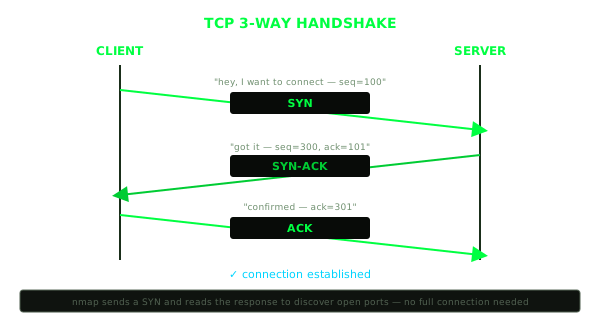
SYN: your machine says I want to connect, sends a starting sequence number.
SYN-ACK: the server says okay, I’m here, acknowledges your number and sends its own.
ACK: you acknowledge theirs. Channel open. Data starts flowing.
Why does this matter to you specifically?
Because nmap’s SYN scan never sends that third packet. It fires a SYN, reads the SYN-ACK back to confirm the port is open, then immediately sends a RST to reset the connection. No completed connection. Faster, and on misconfigured servers, fewer logs. This is why it’s called a “stealth scan”, even though the name is a bit generous since modern IDS will still catch it.
SYN floods work by exploiting this same mechanic. You hammer a server with SYN packets and never send the ACKs. The server keeps allocating memory for connections waiting to complete. Eventually the connection table fills up and it stops accepting new connections. One of the oldest DoS techniques around and it still works in various forms because the underlying protocol hasn’t changed.
DNS: The Part Everyone Ignores Until It Bites Them
You type google.com. Your browser has no idea what that means. Computers talk in IP addresses, not names. So before the actual request even leaves your machine, something else has to happen: DNS resolution.
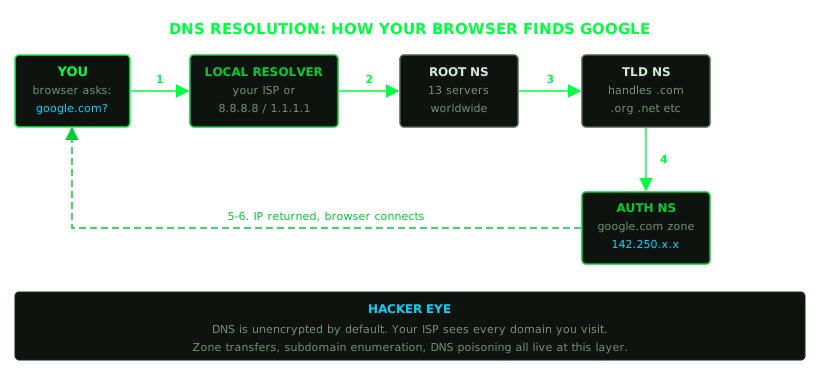
Your machine asks a DNS resolver, usually your ISP’s or something like 8.8.8.8 or 1.1.1.1. The resolver goes through a chain: root nameservers to find who handles .com, then the TLD nameservers, then the authoritative nameserver for the specific domain. Eventually someone answers with an IP address. Now your browser can connect.
Takes maybe 50 milliseconds. You never notice it. But this is where it gets interesting.
DNS is unencrypted by default. Your ISP logs every domain you query. Anyone on your network path can read it. This is why DNS poisoning works: you intercept or manipulate that lookup and return a fake IP. The victim’s machine asks “where is bank.com?” and you say “right here, it’s my server.” They connect to what looks like their bank. They log in.
Beyond active attacks, DNS is one of the best recon surfaces there is. The number of companies that leave interesting information in their DNS is genuinely surprising:
# enumerate subdomains
subfinder -d target.com

# zone transfer attempt (huge if it works, shouldn't be possible but often is)
dig axfr @ns1.target.com target.com

# grab all record types
dig target.com ANY
MX records show you where email goes, which tells you what mail provider they use. TXT records sometimes contain SPF configs, API verification strings, internal tool references. CNAME records map out infrastructure. NS records show you who actually controls the domain. People set this stuff up once and forget about it for years.
HTTP: Where Most of the Bugs Actually Live
The vast majority of web vulnerabilities are at the application layer, in HTTP. You need to understand the request-response cycle well enough that you can read raw traffic and know immediately what’s wrong.
A basic request looks like this:
GET /login HTTP/1.1
Host: target.com
User-Agent: Mozilla/5.0 ...
Cookie: session=abc123
Connection: keep-alive
Server responds:
HTTP/1.1 200 OK
Content-Type: text/html
Set-Cookie: session=xyz789; HttpOnly; Secure
...
Every single field in there is either an attack vector or information you can use.
User-Agent is just a string, you can set it to anything. Cookie is where session hijacking happens. Host header manipulation is behind a whole class of virtual host confusion attacks. Response headers like Server: Apache/2.4.1 just told you exactly which CVEs to look up. X-Powered-By: PHP/7.2.0 just told you more. People leave this information on by default and never think about it.
Status codes matter more than beginners realize:
200    fine, it exists and works
301/302  redirect, watch where it goes, might reveal internal paths
401    auth required, something's behind there worth protecting
403    forbidden, it EXISTS, you just can't access it yet
404    not found
500    you broke something, or the server did, either way it's interesting
403 is more interesting than 404. 404 means nothing’s there. 403 means something is there and someone decided you shouldn’t see it. That’s a door worth knocking on harder.
Packets: The Actual Thing Moving Around
Everything above describes protocols and structure. The actual unit of transmission is a packet: a blob of bytes with headers from each layer tacked onto it.
Open Wireshark on any network interface and you’ll see exactly what I mean. Ethernet frames containing IP packets containing TCP segments containing HTTP requests. The whole stack, live, in real traffic. The first time I actually did this and saw my own browser’s requests going out in plaintext I had this moment of “oh. oh no. everyone can do this.”
And that’s exactly the point. This is how you:
- Pull credentials off unencrypted protocols (FTP, Telnet, HTTP, sometimes others)
- Fingerprint what software is running by how it behaves, not just what it says
- Spot anomalies, weird traffic, signs of something going on in a network
- Actually understand what your tools are doing when you run them
If you haven’t opened Wireshark and filtered to http while browsing a non-HTTPS site, do it before anything else. You’ll see your own requests. You’ll see the data. And you’ll understand immediately why HTTPS matters, and also why HTTPS alone isn’t enough since it leaks metadata including which domains you’re visiting, timing, packet sizes.
Why This Matters More Than Any Tool
Most people starting out jump straight to tools. nmap, Burp Suite, Metasploit. They run commands, get output they can’t read, hit errors they can’t explain, and give up or cargo-cult their way through without understanding anything.
The fundamentals aren’t the slow path. They’re the fast one.
When you know the stack, you know what -sV is actually doing when you give it to nmap. When you know DNS, you know why subfinder can find subdomains the company doesn’t even know are still live. When you know the handshake, the difference between scan types makes sense instead of just being flags you copy from writeups. When you know HTTP headers, every web app stops looking like a form and starts looking like a collection of inputs and trust assumptions waiting to be tested.
The internet is not magic. It’s plumbing. Built by humans, configured by humans, operated by humans who have other things to do and don’t always read the documentation.
That’s why it leaks. Now you know where to look.
Next time, we start actually using this.